Wednesday, January 23, 2008

Now on Comicvision....

For a very long time, I have wanted to find a way to show my comics in a single browser, with downloadable modules containing individual issues. So, I finally got up the willpower to sit down and write the program. I am not a programmer, but I have been tinkering with flash for a few years, so I chose to do it in flash. Instead of downloadable modules, I created it so that every page is downloadable. This way, it is all contained in a single panel, with no files on your hard drive that you have to search for, etc. I believe the big plus is that you can copy and paste the code to your website, blog, or Myspace page, like an embeddable Youtube player for comics. That makes it even cooler! :D


Online Comics at 3Witches.net


Source Code:

<object width="558" height="480"
type="application/x-shockwave-flash"
allowScriptAccess="never"
data="http://threewitches.comicgenesis.com/3w-001a/
3w-001a.swf">
<param name="movie" value="http://threewitches.comicgenesis.com/3w-001a/
3w-001a.swf"></object>
<br><a href="http://www.3witches.net">Online Comics at 3Witches.net</a>

Tuesday, January 1, 2008

Adobe Photoshop Textures and Effects Video Tutorial 1 - Parchment

A few years ago, I experimented with Photoshop to try and make something look like an old piece of parchment for a website I was working on for my online comic books. Recently, I started a new site for my online comics, and finally found a solution. I created an Adobe Photoshop video tutorial showing how I made the parchment effects on my website. The website will be up soon, so check back to see it in action. It's at: http://realmwalkers.comicgenesis.com. Check out the video and let me know what you think!


View this video on MySpace, Metacafe, Google, Revver, DailyMotion and Veoh

Sunday, December 16, 2007

Youtube Vids: Viral, or Just Sick?

In doing my artwork and posting videos on Youtube and other video sites, I've been trying to find out a little bit about getting seen, and from what I've seen, it's a pretty methodical process to actually make a video go "viral."

I haven't actually experimented with most of the practices because they aren't all ethical, but some of the websites that I've come across actually presented some very good information. I decided to list a few of the more helpful hints on getting more views on Youtube. So, here they are:

1. Blogs - *ahem* I don't know what you're talking about. No, not just this kind of blogging. I like to find other blogs with similar content as mine, and post a relevant reply to the post. This creates an instant link to your blog (or website, Youtube channel, etc.) One website suggested that you pay others to post blogs linking to your video. I find this practice a little...questionable, at best.

2. Forums - Why not? I have accounts at several forums, and I've used them as well as I know how. Some other users can be very critical of what you're posting, but if your content is strong enough, other users will defend you outright. Plus, controversy around your ideas are not a bad thing, you know.

One example of controversy I have in mind was a person who posted my video in their blog, and explained that I spent 9 hours on the Dumbledore painting that I did. For one, this sparked a lot of interest around the fact that I liked Harry Potter enough to spend 9 hours on a painting of one of the characters. BUT, the first comment on the post was completely negative, saying my version looked more like Gandalf than Dumbledore. Other readers then came to my defense. Also, they spent several posts debating what scene I was trying to represent in the painting. The fact is that I was actually only loosely depicting the escape scene in Dumbledore's office. The point is the fact that the more you can generate discussion around your work, the better. Some people will like your work, and some will not. If you have something that's worth discussing, that makes your work stand out to the readers (0r viewers), and it just might generate some interest in what you're doing. :)

3. Social Networking (Myspace, Facebook, etc.) - This one works, but it requires a lot of "legwork." Since I have been trying to promote my videos, I have been trying to beef up my friends lists, and posting bulletins with links to my vids in them. So far, it seems to be somewhat effective, I haven't been able to track links from my bulletins, so not too sure. But, theoretically, this should work well.

You also have the ability to directly post videos to others' comments, though you may want to use caution in doing this, because some people don't like the fact that videos or large graphics can mess with the layout of Myspace pages. So, use your own judgment here.

4. Email Lists - Hmmm, yeah. This one I can see working out okay, only if you have permission to email your recipients. I personally use #5.

5. Youtube Friends and Subscribers - I'm finding out that subscribers are important, but there are other strategies to working the Youtube system. One thing that works sometimes and sometimes not is adding other people as friends, like on Myspace. I have to say that it is much harder to get a Youtube user to befriend you than it is to add people on Myspace. Youtube sends your new friend an email that says that you want to be able to share private videos with them. To a lot of people, this sounds like an indecent proposal, but we're only using it for the forces of good! :)

I've found that one thing you want to do before you ask someone to be your friend is drop them a line. You don't always have to be on their friends list to post a comment to their channel, like on Myspace, so I always leave a short message to say "Hi," or to comment on one of their videos. This sort of lets them know you're not trying to send them 30 porn links without even a kiss.

--J.T.

Links:
The Secret Strategies Behind Many “Viral” Videos
TUTORIAL - How To Get MORE VIEWS on YouTube videos.. REALLY!

Tuesday, December 11, 2007

It Is My Lifelong Ambition...

It is my lifelong ambition to put Richard Simmons in a headlock and ram his head into a wall repeatedly. It is my lifelong ambition to be able to draw and paint whilst I sleep. It is my lifelong ambition to quit my job and bum off of everyone else's tax dollars to buy beer and crack. (Okay, that one's not true.) It is my lifelong ambition to visit Scotland, Wales, England, and maybe Germany, and take a tour of all of the castles there. It is my lifelong ambition to don a unitard, grow my hair long and curly, and sing (or play drums) in a hair metal band. It is my lifelong ambition to be able to support my family from doing my artwork.

I just thought I would post some of my lifelong ambitions. Now, I want to hear yours. Post a comment with your lifelong ambitions, no matter how small or astronomical. C'mon, it's just for fun!

Saturday, December 8, 2007

"Ghostly Choir"

Last night, I had the chance to do a little painting, and I decided to do what the name actually says: a speed painting. The term has come to mean a video of a digital painting in progress but at a higher speed, but I wanted to try my hand at an actual digital painting done within an hour. I had some trouble with my computer lagging behind massively, even in 300dpi, but I actually did complete it in about an hour.


View this video on YouTube, Metacafe, Revver, DailyMotion, Blip.tv, Veoh and Stupid Videos

Enjoy!
--J.T.

Thursday, December 6, 2007

Dumbledore Speed Painting


View this video on YouTube, Metacafe, Google, DailyMotion, Blip.tv, Veoh and Stupid Videos

This is my newest digital painting, entitled "Flames of Redemption." For those who are not Harry Potter inclined, it is based on the headmaster at Hogwarts School of Witchcraft and Wizardry, Professor Dumbledore. The original was done in about 9 and 1/2 hours in Adobe Photoshop. Now watch it and like it, filthy muggles!

Friday, November 30, 2007

Adobe Photoshop Tutorial - Working With Selections and Quick Mask Mode

By J.T. Blevins

One great feature of Adobe Photoshop is "quick mask" mode. Usually, to avoid painting over different elements of my work, I think of using the lasso tool to make selections of the areas I want to keep my color inside. BUT, there is an alternative, and one with much more flexibility.

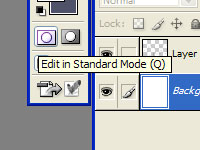
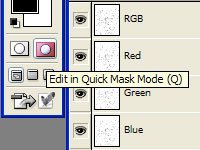
In Fig. 1, the picture shows two buttons, located at the bottom of the tool window, just underneath the color selector boxes. These buttons are "Edit in Standard Mode (Q)" and "Edit in Quick Mask Mode (Q)."

Fig.1


Fig.2

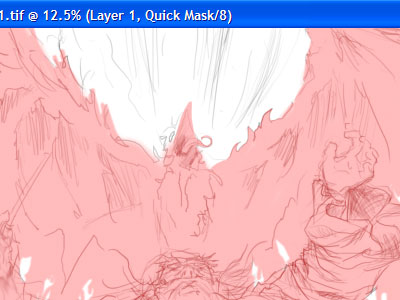
We'll begin with a quick sketch, and enter Quick Mask mode. This mode enables the artist to use any brush to create selections in a new creative way. By drawing in this mode, you are creating a selection area to work with in Standard Mode. The translucent red area of your selection is the area that will NOT be included in the selection.
Experiment with different brushes. Try varying opacity, brush size, shape and behavior. You'll be surprised at the effects you can create by changing brush styles!


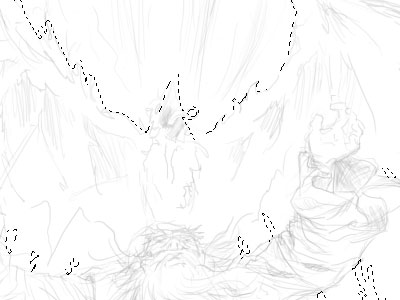
After we have our selection, it's time to go back to Standard Mode. Click the button on the left at the bottom of the Tools window.
Fig.3


Fig.4
This takes the quick mask and turns it into a selection. Pretty cool, huh?


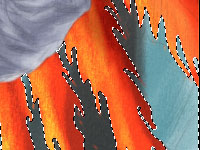
Now, we can paint our background around the main subject without intruding on it (while you still have your selection, that is.)

Fig.5


Fig.6
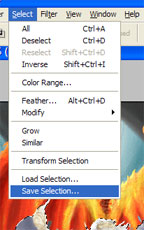
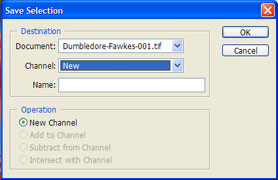
Now that you've spent all that time creating your selection, it is time to save it for later use. Click on Select>Save Selection...


...And choose a name for the selection layer you want to save.

Fig.7


Fig.8
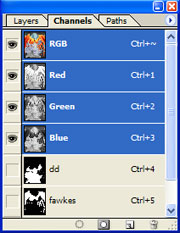
The new selection layer will now show up under the Channels tab. Now you can [Ctrl]+click to reload the layer as a selection.


The nice thing about the quick mask feature is that you can switch back and forth at any time during your painting. You can go back and re-adjust the part of the picture you now want to edit.

Fig.9


Fig.10
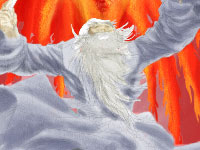
There is also a lot to gain from using selection layers. As you can see, the composition of your painting begins to become clear. We can now see the negative space much more easily! :)

Monday, November 26, 2007

What Makes a Good Digital Painting?

So, how does an artist choose subject matter for his next digital painting, and what style do you use? This has been a topic I have been mulling over lately. Basically, I use my gut instinct when painting. When painting Hellboy, I wanted to use a bold style with good lighting. With the Turtles painting, I wanted to paint something a little more "gritty," but with pretty much the same bold style. Aragorn and Arwen deserved a little more realism, so I pretty much went with the painted look.

I'm now working on a Harry Potter painting that includes Prof. Dumbledore and Fawkes the phoenix. I'm really going experimental on this one, making it look more like a watercolor painting than anything. And, that's fine. But for the TMNT? I don't think watercolor would have worked.

I have seen many other styles work very well in digital paintings, but most other digital painters have one style and stick with it. I like to experiment, to try and pull out of the painting the most aesthetic work that I can. If watercolor works, I use it. If the subject requires a more cartoony, smooth feel, then I go with it. If it needs a style that is more serene or surreal, I'm using watercolor. Don't be afraid to test your limits. As an artist, if you limit yourself, you're placing a mental block on your work. And that's not something you really want to do.

So, what makes a good painting? I guess I'd say to paint from the heart, paint what you know, and always experiment! :)

--J.T.

Saturday, November 24, 2007

Lord of the Rings Painting Video


http://www.revver.com/video/507244/lotr-lord-of-the-rings-movie-aragorn-and-arwen-speed-painting-love-scene/

Here is the video for my LOTR painting of Aragorn and Arwen. Enjoy!

--J.T.

Lord Knows I Love Lord of the Rings!


For it being Thanksgiving weekend, I had a little time to do some painting. And, what better to paint than a LOTR frame from the movie? I've always been a Lord of the Rings fan. The first novel I ever read was The Hobbit in about 7th grade, and from that point on, I was hooked. Before that, I couldn't conceive of reading something that wasn't a comic book. The fact that something that used only words to tell a story and was interesting to boot was hard to believe.

So, as I'm sure you can imagine, when the movies came out, I was absolutely ecstatic. So now, I have all the DVD's. I don't get the time to watch them or read the books anymore, but anyway... I still have the curious mind of a child when it comes to Tolkien's masterpiece.

I chose to paint a picture of Aragorn and Arwen because their love for one another was one of the most powerful parts of the trilogy. Even when Aragorn is off in distant lands fighting a battle from which he may never return and another love tempts him, he stays true to her. Their love seems like a pure kind of love, one that some of us will never experience. So, that's why I wanted to capture a moment that inspires this feeling of true love. Because, some of us may not be so fortunate...

--J.T.

Wednesday, November 21, 2007

Turtle Power!


It's been a bit hectic this week because my work switched me from 2nd shift to day shift this week for Thanksgiving, among several other things I had to take care of... But, I had a chance to do a little painting over the weekend. I have always been a Turtles fan, and this was kind of an itch I've been wanting to scratch for a long time. I did a pin-up a couple years ago, fully inked and colored, but even since then, I've been wanting to do something that captures the turtles' essence, and I believe this is it. As a kid, I was never a Raphael fan, but as I grow older, I feel like I have more and more in common with him. Not that I go around wanting to kick the crap out of everyone, but things tend to make me angry that didn't before. I didn't want to do a solo painting, so I had to find a way to include the other 3, too! Yih, boyz! Now I have to do a Flav-a-flav painting. And, A Flock of Seagulls. And, and, Milli Vanilli! I can't stop! Vanilla Ice! MC Hammer! WTF? Somebody kick me in the junk!

Saturday, November 10, 2007

New Hellboy Digital Painting Video in Photoshop


View this video on YouTube, MySpace, Metacafe, Google, Revver, DailyMotion, Blip.tv, Veoh and Stupid Videos

Hellboy Speed Painting

Been sharpening my pixels lately to get a Hellboy digital painting finished. It took a while on this one, actually about 4 or 5 days in my off time, but it was a lot of fun. I'm still learning a lot about painting in Photoshop, but I'm getting addicted fast! I haven't done a page of comic book work since I've been learning how to paint digitally. I'm sure I'll get back into the swing of things here in a couple weeks, but for now, I'm having too much fun painting some of my favorite characters (which happen to be comic book characters).

--J.T.